
Murasu Anjal 12.1.11 and the New File Converter
By Muthu Nedumaran Tamil Version
Murasu Anjal 12.1.11 was released today for Windows and macOS. The main addition is a new tool, the Murasu Anjal File Converter, which converts Tamil documents written in older encodings to Unicode.
Older versions of Murasu Anjal included the converter as a plug-in for Microsoft Word and PowerPoint. We have discontinued that plug-in. The code was old and depended on an older Microsoft framework, and that caused problems with deployment and installation. We looked at a few other ways of keeping the converter inside Office, and none of them was a good fit. So we built a separate tool instead, which works on both Windows and macOS.
What It Converts
The converter reads documents written in TSCII, TAB, TAM, Murasu 6 and the earlier Anjal encodings. It also handles several others that were widely used, including Tharagai, Thunaivan, Kanian and Mylai. It works on Word documents (.docx) and plain text files (.txt). Microsoft Office does not need to be installed to run it.
Some older formats need one extra step first. For Word 97-2003 files (.doc) and Rich Text Format files (.rtf), open the file in Word, or in any other application that can read it, and save it as .docx. Then convert that. Old Murasu .mrt files can be renamed to .rtf and then taken through the same route.
How It Works
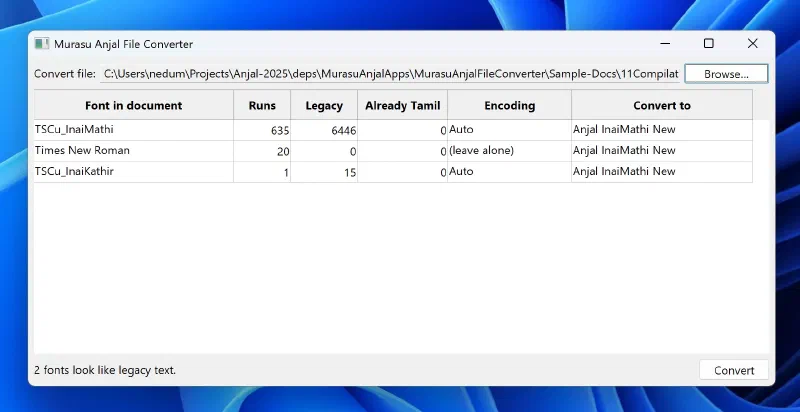
Drag a .docx file onto the converter window, or use the Browse button. The converter then lists every font it finds in the document. For each font, it shows how many runs of text use it, how much of that text looks like legacy encoding, and which encoding it believes the text is in. Nothing changes until you press Convert.
The detected encoding is generally right, because it comes from the font name. However, old documents sometimes lose their font names, and in those cases the converter has to guess from the text itself. You can override the encoding for any row. Rows it cannot identify are left alone by default, since decoding text that was never legacy would damage it.
The converter never modifies your original file. It writes a new one beside it, with “(Anjal)” added to the name, so Report.docx becomes Report (Anjal).docx.
Choosing the Target Font
Every row also has a target font, and you can change it before converting. The default is Anjal InaiMathi New. The list covers the Anjal fonts included with your licence, so a document won’t be set in a font that isn’t installed on your computer.
Fixing Fonts in Unicode Documents
Not every document that needs attention is in a legacy encoding. Tamil text pasted from a website or an email often ends up in Latha or Nirmala UI. Documents created with Murasu Anjal 10 are already in Unicode, but they use the older versions of our fonts.
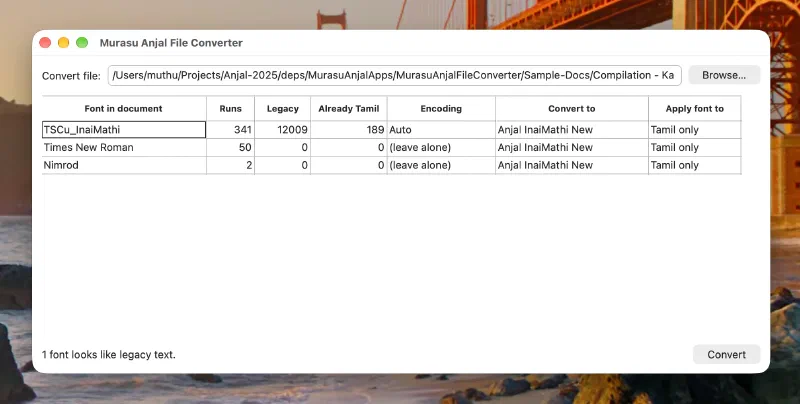
For these, choose “Change font only” in the encoding column. The text is not decoded, and only the font changes. Documents in Anjal 10 fonts are matched to their newer replacements, so a document in Anjal Paari moves to Anjal Paari New and keeps the typeface the author chose.
Teachers are a good example. Many have documents created in Anjal InaiMathi Sch Book, and the converter can replace it with Anjal New InaiMathi Sch Book.
By default, only the Tamil text is changed, and English text stays in whatever font the author used. If you would like the English text to match as well, set “Apply font to” to “All text”.
Starting the Converter
You can open the converter from the Murasu Anjal menu on both platforms. On Windows it is in the tray icon menu, and on macOS it is in the input method menu.
The File Converter section of the user guide covers it in more detail.
PowerPoint Files
Support for PowerPoint (.pptx) files is not available yet. We will add it if there are enough users who still have old presentations that need converting. If you have such files, please write to us at support@anjal.net.
Getting 12.1.11
The update is available from the download page, and the converter is installed along with the rest of Murasu Anjal 12. Converting needs a Murasu Anjal 12 Personal or Premium licence.
In the sample documents we tested, the converted text matched what the original documents said, but old files vary a great deal. If you find one that doesn’t convert properly, please send it to support@anjal.net, and we will look at it.